
Fust Survival Crafting Guide: Open the Menu and Make Your First Tools
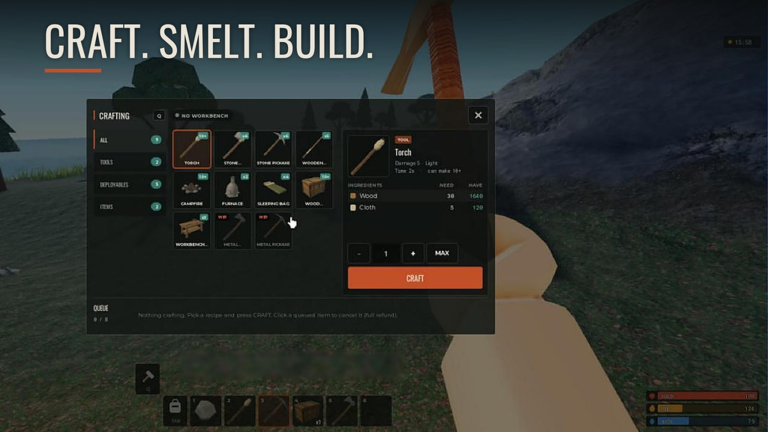
Press Q to open Fust Survival's CRAFTING menu, pick a TOOLS recipe such as the Stone Pickaxe, read the ingredient list and craft your first tools once you have enough Wood and Stones.
Quick answer
Press Q to open the CRAFTING menu, choose the category that holds the tool you want, select the recipe and read its ingredient list before pressing CRAFT. If the button reads NOT ENOUGH RESOURCES, close the menu, gather the missing Wood or Stones and try again.
- Q — CRAFTING, TAB — INVENTORY and E — USE/OPEN/DRINK appear together on the in-game CONTROLS panel
- The menu's category tabs are ALL, TOOLS, WEAPONS, CLOTHING, DEPLOYABLES, BUILDING and ITEMS
- A selected recipe shows its stats, its ingredients and a CRAFT button
- Keybinds can differ if your settings change, so check CONTROLS if Q does not open the menu
Open the CRAFTING menu with Q
In Fust Survival, the recipe screen is one keypress away. The in-game CONTROLS panel lists Q CRAFTING alongside the other core shortcuts, including TAB INVENTORY and E USE/OPEN/DRINK. Press Q and the CRAFTING menu opens over the game.
Keybinds are settings-dependent. If Q does nothing in your client, open the CONTROLS panel and confirm which key CRAFTING is assigned to before deciding the menu is unavailable. The same caveat applies to any shortcut that has been rebound.
The menu is organised around categories rather than one long list. Its tabs are ALL, TOOLS, WEAPONS, CLOTHING, DEPLOYABLES, BUILDING and ITEMS. The same menu can display a NO WORKBENCH label, and EXPLOSIVES appears as an additional category, so the tab strip can look different depending on the state of the game. When you are after your first tools, start in TOOLS; ALL is the fallback when you are not yet sure where a recipe lives.
Read the recipe details before you craft
Selecting a recipe is how the menu tells you what a craft needs. With the Stone Pickaxe selected, the screen showed Damage 15, Time 2s and "can make 5" as the item's stats, an ingredient line of Wood 200 / Stones 100, and a CRAFT button underneath.
The pattern repeats for other recipes: choose the item, read the inputs on its panel, then press CRAFT when you are ready. The ingredient line also works as a gather list — it tells you what to collect before you come back.
Those Wood and Stones numbers appeared with a DOUBLE RATES event active, so use them to understand how the recipe panel presents its costs rather than as the fixed price of a Stone Pickaxe on every server. What stays constant is the layout: the selected recipe's stats, the ingredients it requires and the CRAFT button.
Make your first tools
The order matters less than the checks, but this is the practical sequence for turning a fresh spawn into a working tool set.
- Gather the basics. Wood and Stones are the first ingredients your tool recipes will ask for. If you are unsure where to find them, the resource gathering guide covers the routine.
- Press Q to open the CRAFTING menu.
- Open the TOOLS category.
- Select the tool recipe you want. The menu's tool recipes shown included the Hammer, Building Plan, Stone Hatchet, Stone Pickaxe and Wooden Spear.
- Read the ingredient line and compare it with what you are carrying.
- Press CRAFT if the button is available. If it reads NOT ENOUGH RESOURCES, gather the missing material and return.
- Repeat for the next tool.
The Building Plan sits in the same menu as the stone tools, and the STARTER GOALS panel names crafting one as an early objective, so it belongs in your first crafting pass rather than a later one. Once the basics are made, the tools overview is the place to look at the broader set, and the crafting recipes page holds the wider item catalogue if you need a specific recipe.
When the CRAFT button says NOT ENOUGH RESOURCES
The CRAFT button doubles as a status indicator. When you are short on materials it reads NOT ENOUGH RESOURCES instead of completing the craft. In the DEPLOYABLES category, the Tool Cupboard recipe listed Wood 1000 while the player carried 200, and the button showed that message.
The fix sits in the same panel. Compare the ingredient line with your inventory, close the menu, gather the difference and reopen the recipe. Because the message is tied to the selected recipe, an expensive craft can stay blocked while a cheaper tool recipe in another category still has a working CRAFT button.
Where crafting sits in the survival loop
Fust Survival's official description lays out the shape of a run: you wash up on the beach with a rock and a torch, gather wood, stone and ore, craft tools, smelt metal in your furnace and build a base worth raiding. Crafting is the step that turns the first two stages into the last two — it is what converts gathered materials into the pickaxes, hatchets and building items the rest of the loop depends on. Metalworking continues that chain in the furnace guide, while the base itself is covered in the base defense guide.
Your progress saves on your server until the weekly Friday wipe, which is worth keeping in mind when deciding how far to push each crafting session. The wipe schedule explains that reset rhythm.
Crafting controls at a glance
| Input | What opens |
|---|---|
| Q | CRAFTING — category tabs, the selected recipe's stats and ingredients, and the CRAFT button |
Once Q becomes a habit, the first-hours sequence is straightforward: gather Wood and Stones, open the menu, read the recipe panel, and craft the stone tool set before moving on to building. The beginner guide puts those steps in the context of a full opening run if you want the gathering, crafting and base stages in order.
Related Guides
Craftable Tools and Their Jobs
What the Stone Pickaxe, Hammer and Building Plan each do and which one your next task needs.
Current Recipe Costs
Current panel costs for the Stone Pickaxe, Tool Cupboard, Workbench 1 and Gun Powder at a glance.
Furnace Window and Controls
Understand the furnace window: resource slots, fuel slots, output and the buttons that run a smelting session.