
Fust Survival Beginner Guide: What to Do First on the Beach
Spawned on the beach in Fust Survival? Here is what you start with, the STARTER GOALS checklist, the controls you need, your first tool crafts and how to place a foundation, door and sleeping bag.
Quick answer
You spawn on the beach with a rock and a torch. Hit trees with LMB to collect Wood (they also give Cloth), gather stones, then follow the STARTER GOALS panel: 250 Wood, 100 Stones, craft a Building Plan, place a foundation, a door, a Tool Cupboard and a sleeping bag.
- Press Q to open crafting — basic tools can be made even while the menu shows NO WORKBENCH.
- Craft a Stone Pickaxe, then mine rock nodes for Metal Ore and Sulphur Ore.
- The Building Plan shows a semi-transparent foundation ghost before anything is placed.
- Place a Sleeping Bag early: it appears on your death screen as an alternative to respawning on the beach.
- Progress saves on your server until the weekly Friday wipe.
The developer's description of the loop is also the order the game pushes you through: gather wood, stone and ore, craft tools, smelt metal in your furnace and build a base. The STARTER GOALS panel on the HUD turns that into seven first milestones.
The STARTER GOALS checklist
Checklist
- Gather 250 Wood
Trees are the early source; a swing with the starting tool logs Wood, and Cloth comes with it.
- Gather 100 Stones
Stones come out of rock nodes, the same rocks that carry ore.
- Craft a Building Plan
A blueprint item in the crafting menu that handles foundation, wall and doorway placement.
- Place a foundation
The Building Plan shows a semi-transparent foundation ghost on the ground before you place it.
- Place a door
A doorway built from the plan can take a Wooden Door.
- Place a Tool Cupboard
A Deployables recipe with a large wood cost that places a monopolize bubble around the base.
- Place a sleeping bag
Creates a respawn point that appears in the SLEEPING BAGS list when you die.
The first two goals are resource totals; the rest are crafting and placement. The foundation and door both need the Building Plan first, so that craft is the hinge of the list. The Tool Cupboard is the expensive placement: its recipe listed a Wood cost of 1000, and the CRAFT button showed NOT ENOUGH RESOURCES while the player was carrying 200 wood.
What you have when you spawn
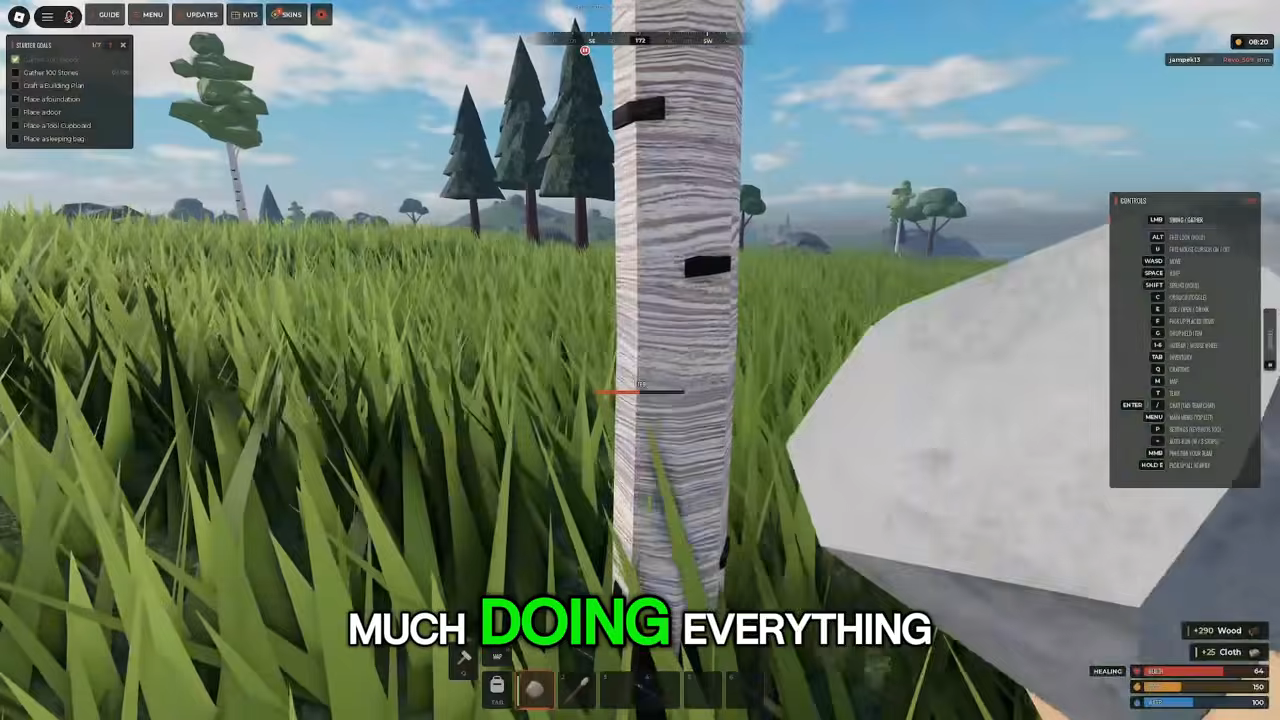
Your starting equipment is a rock and a torch. The rock is the gathering tool — swinging it at a tree produces Wood and Cloth — and the torch belongs to the spawn kit.
Before you enter the world you pass a survivor customization screen with skin color, hair options (Short or Bald) and face, then confirm. In-game, M opens a full-island map with labeled points such as Outpost, which helps you judge where you landed before choosing a spot to build.
Controls to learn first
Default Fust Survival controls
- Action
- Swing / gather
- Key
- LMB
- Action
- Aim / throw
- Key
- RMB
- Action
- Free look
- Key
- ALT
- Action
- Sprint
- Key
- SHIFT
- Action
- Crouch / uncrouch
- Key
- C
- Action
- Use / open / drink
- Key
- E
- Action
- Pickup / place item
- Key
- F
- Action
- Drop held item
- Key
- G
- Action
- Holster
- Key
- H
- Action
- Inventory
- Key
- TAB
- Action
- Crafting
- Key
- Q
- Action
- Map
- Key
- M
- Action
- Talk
- Key
- T
- Action
- Chat
- Key
- ENTER
- Action
- Menu
- Key
- ESC
LMB is the gather action, so it does most of your early work. Q opens crafting and TAB opens the inventory. E is the general interaction key — use, open, drink — while F picks up or places an item and G drops what you are holding. Map, chat and menu sit on M, ENTER and ESC.
Gathering wood with the starting tool
Hitting a tree with the starting tool produces Wood and, less obviously, Cloth. In a session recorded on a modded server running a DOUBLE RATES event, a swing sequence logged +290 Wood and +25 Cloth. The resource types are the reliable part; the amounts belong to that event, so do not plan your 250 Wood goal around them on another server.
Wood is the material you will spend most of in the opening: the starter goal asks for 250, the Stone Pickaxe recipe listed 200 Wood, and the Tool Cupboard listed 1000. The resource gathering guide covers where the other materials come from.
Crafting your first tool
Q opens the crafting menu with the categories ALL, TOOLS, WEAPONS, CLOTHING, DEPLOYABLES, BUILDING and ITEMS. Early in a run the menu carries a NO WORKBENCH label, yet the Stone Pickaxe recipe was there to craft — a workbench is not required for your first pickaxe.
The Stone Pickaxe in TOOLS lists Damage 15, Time 2s, the label can make 5, and ingredients of Wood 200 and Stones 100. Those recipe figures, and the other amounts quoted in this guide, were observed on a modded DOUBLE RATES server, so a standard server may ask for different numbers. What carries over is the shape of the recipe: a short craft time, several copies from one set of materials, and a mining tool with a damage stat. The crafting guide takes the menu further once you have a workbench.
The Hammer matters around the same time. Holding it at a built twig structure shows an upgrade interaction, and after upgrading the log reads Upgraded to Wood — that is how a twig frame becomes a wooden one.
Stone, ore and the pickaxe
The Stone Pickaxe mines sulphur ore and metal ore from rock nodes. Sulphur ore is easy to spot: yellow crystal spikes on a grey rock node. Mining logs gains of Sulphur Ore, Metal Ore and Stones together, so the same rock node serves both the 100 Stones goal and your ore supply.
That is also where the early grind starts paying off. Metal Ore goes to the furnace, and Sulphur Ore is one of the furnace's accepted resources alongside HQM Ore and Raw Meat.
Smelting metal in a furnace
The furnace interface is arranged around FOR RESOURCES slots for Wood, Metal Ore, Sulfur Ore, HQM Ore and Raw Meat, each with +50 and +ALL buttons, plus FUEL and OUTPUT slots and TAKE ALL and LIGHT buttons. Ore goes into the resource slots, and the smelted metal comes back into your inventory as Metal Fragments. The furnace prints its own burn and smelt rates; the figures seen in the recorded session belong to the DOUBLE RATES server, so treat burn and smelt speeds as server-specific. The furnace guide covers the interface in more detail.
First base pieces
The Building Plan is a blueprint item: selecting it projects a semi-transparent ghost of a foundation on the ground before you commit. The same item builds Foundation, Wall and Doorway pieces and installs a Wooden Door, so you can see exactly where a piece will land and line up the next one against it.
Once the frame is standing, the Hammer's upgrade interaction turns twig into wood. A Key Lock can be crafted and installed on a door, and the door then shows Lock and Unlock prompts — the step that secures the entrance you just built.
The Tool Cupboard is the base's protection claim. Its Deployables recipe says it places a monopolize bubble, and the on-screen description presents it as protection against base decay and unauthorized building. At a listed cost of Wood 1000 it is the goal that most changes your wood budget, which is why it sits after the foundation and door in the starter list.
The Sleeping Bag closes the checklist. Placing one creates a respawn point that shows up in the SLEEPING BAGS list on the death screen, as an alternative to respawning on the beach.
Death, respawn and the weekly wipe
The YOU DIED screen names your killer and the weapon used, offers a REPORT button and a RESPAWN ON BEACH button, and lists your SLEEPING BAGS. On death the player drops carried items, so a placed bag is what decides where the next life starts.
Fust Survival is in early access, and the official game description says progress saves on your server until the weekly Friday wipe. That wipe is the horizon for everything you gather and build; the wipe schedule covers the timing, and the base defense guide covers what to do once the first walls are up.
Related Guides
Crafting Menu and First Tools
Open the CRAFTING menu with Q, read recipes and craft the Stone Pickaxe and your other first tools.
Gathering Wood, Stone and Ore
Learn how to collect wood, stone and ore with your first tools, plus what each material is used for.
Fast Progression to Metal-Tier Gear
A supported order from beach spawn to metal-tier gear, a secured base and your first Workbench without guessing.