
Fust Survival Furnace Guide: Read the Furnace Window, Slots and Controls
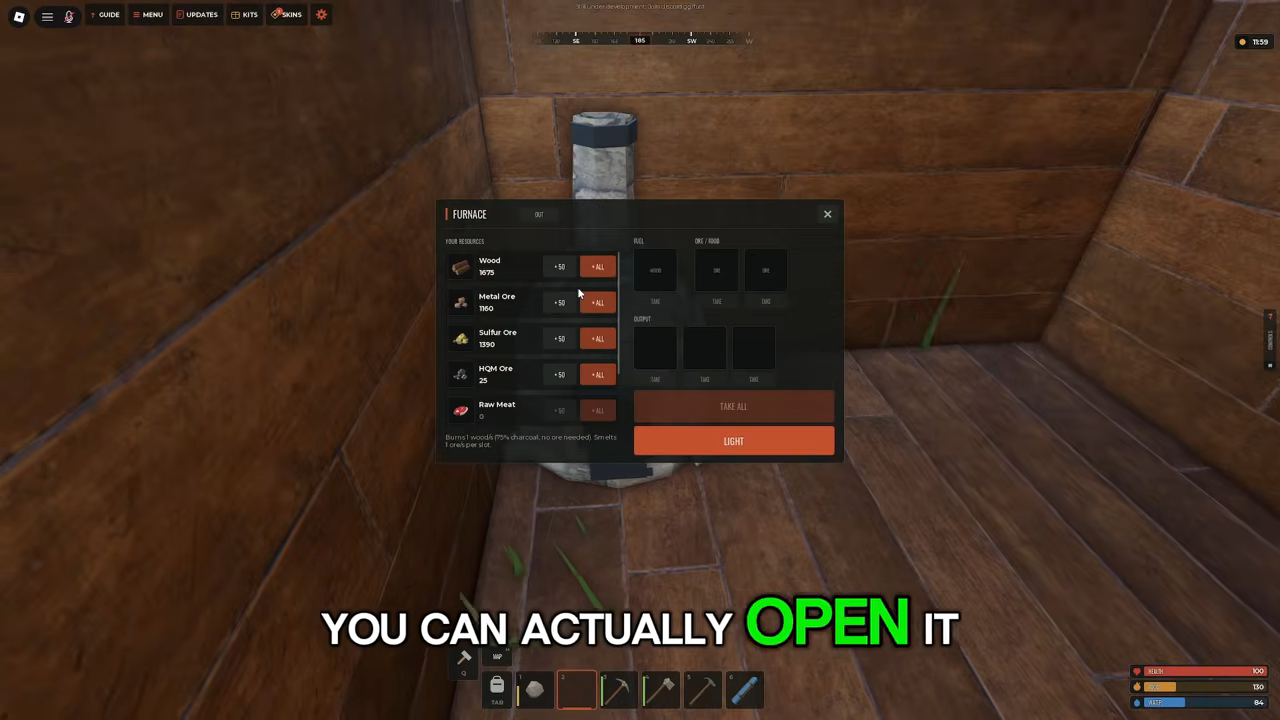
The FURNACE OUT window has FOR RESOURCES slots with +50 and +ALL buttons, separate FUEL slots, OUTPUT slots, and TAKE ALL and LIGHT buttons.
Quick answer
The FURNACE OUT window has FOR RESOURCES slots with +50 and +ALL, separate FUEL slots, OUTPUT slots, and TAKE ALL and LIGHT buttons; its footer gives the burn and smelt line.
- The furnace window is titled FURNACE OUT.
- +50 loads fifty from a stack and +ALL loads the whole stack.
- LIGHT starts the burn; the footer tells you how fast the wood goes.
- The player's inventory later logged '+52 Metal Fragments', showing smelted metal reaching the player's inventory.
The furnace is the smelting step in Fust Survival's starting loop. The official game description runs the intended progression from washing up on the beach with a rock and a torch, through gathering wood, stone and ore and crafting tools, to smelting metal in your furnace and building a base worth raiding. Metal sits between the gathering phase and the crafting that follows, so the furnace screen is worth learning early. If you are still on the beach, the Fust Survival beginner guide covers the start, and Fust Survival ore locations covers where the ore comes from.
What the furnace window contains
Opening a furnace gives you a window titled FURNACE OUT. It works like a small production line inside one panel: resource slots hold what you want processed, fuel slots hold what burns, output slots hold the result, and a couple of buttons act on the whole thing.
Furnace window at a glance
- Part of the window
- FOR RESOURCES slots
- What it does
- Where the material to be processed goes. The furnace in the example listed Wood, Metal Ore, Sulfur Ore, HQM Ore and Raw Meat.
- Part of the window
- +50 and +ALL
- What it does
- Buttons beside each resource slot. +50 loads fifty; +ALL loads the whole stack.
- Part of the window
- FUEL slots
- What it does
- Separate slots for the wood the furnace burns.
- Part of the window
- OUTPUT slots
- What it does
- Where finished material collects.
- Part of the window
- TAKE ALL
- What it does
- A button in the furnace window, listed with the OUTPUT slots and LIGHT.
- Part of the window
- LIGHT
- What it does
- Starts the furnace burning.
- Part of the window
- Footer line
- What it does
- The furnace's own readout: 'Burns 1 wood/5.75s, 75% charcoal, no ore needed. Smelts 5 ores per slot.'
Two details are easy to skip over. The +50 and +ALL buttons sit beside every resource slot, so loading is a click rather than moving items one at a time. And the footer is the furnace's own spec sheet, stating the burn rate, a charcoal figure and how many ores a slot smelts. Those numbers are specific to the server, so read the footer on your own furnace instead of assuming an example's rates apply.
Loading ore and fuel
The window's FOR RESOURCES area lists Wood, Metal Ore, Sulfur Ore, HQM Ore and Raw Meat, each with +50 and +ALL buttons beside it.
Wood appears in that resource list as well, but the furnace treats wood as fuel: the footer says it burns wood, and the window keeps a separate set of FUEL slots for it. The footer states how quickly wood burns.
One player's furnace shows what a loaded screen looks like: Wood 1675, Metal Ore 1160, Sulfur Ore 1280, HQM Ore 0 and Raw Meat 0 across the resource slots. Those figures are that player's stock at that moment, not a target to match — a slot showing 0 is simply empty.
Reading the footer
The line under the slots reads 'Burns 1 wood/5.75s, 75% charcoal, no ore needed. Smelts 5 ores per slot.' That is the furnace's own description of its settings. The burn rate is the fuel side — one wood every 5.75 seconds on this furnace — and 'Smelts 5 ores per slot' is the ore side, telling you the batch each resource slot works through. The charcoal figure sits in the same readout, and charcoal is a crafting ingredient in its own right, as covered below.
Because those rates are server-specific, a furnace on another server can print different numbers. The footer on the furnace in front of you is the one that describes your burn.
Lighting it and collecting the metal
The window has a LIGHT button, and its footer says the furnace 'Burns 1 wood/5.75s' and 'Smelts 5 ores per slot'. The OUTPUT slots and the TAKE ALL button sit in the same window.
The result to look for is Metal Fragments. The player's inventory later logged '+52 Metal Fragments', showing smelted metal reaching the player's inventory.
What the first metal is for
At the start of a session, the CRAFTING menu shows a NO WORKBENCH label above its ALL, TOOLS, WEAPONS, CLOTHING, DEPLOYABLES, BUILDING and ITEMS categories. Recipes that work without a workbench come first, and metal-based craftables wait behind Workbench 1, which is listed at 50 Metal Fragments and 500 Wood. That places the furnace squarely in the early game: the Metal Fragments you smelt are the material you need to build your first workbench, and the metal recipes follow from there. The Fust Survival crafting guide covers where those recipes lead.
Charcoal, named in the furnace footer, reappears in crafting as well: Gun Powder is made from Sulphur 10 and Charcoal 10 and yields 10 Gun Powder. So the furnace's readout touches two parts of the early crafting tree — metal for the workbench and charcoal for Gun Powder.
Controls around the furnace
Three controls do the handling around the smelting loop:
- E — USE/OPEN/DRINK. This is the key that opens a furnace you are standing at.
- F — PICKUP/PLACE ITEM. Places a held placeable item.
- G — DROP/HELD ITEM. Drops the item you are holding.
The rest of the work happens inside the furnace window through its slots and buttons.
A note on updates
Fust Survival is in early access and adds new features with every update, so the furnace window described here can change as the game develops.
Related reading
Related Guides
What to Smelt in the Furnace
Know which resources go in the furnace and what each turns into, from ore to metal fragments and cooked food.
Ore Locations and Mining
Locate sulphur and metal ore veins on the island, craft the pickaxe you need and smelt the results.
Craftable Tools and Their Jobs
What the Stone Pickaxe, Hammer and Building Plan each do and which one your next task needs.