
Fust Survival Tools: What Each Craftable Tool Does
Stone Pickaxe, Hammer and Building Plan each have a confirmed job in Fust Survival; see what each craftable tool does and which to craft for your next task.
Quick answer
Five tools are craftable in the Q CRAFTING menu — Hammer, Building Plan, Stone Hatchet, Stone Pickaxe and Wooden Spear — and three of them have a confirmed job.
- Breaking ore nodes → Stone Pickaxe: mines sulphur ore and metal ore.
- Laying out a base → Building Plan: places foundations, walls and doorways, and installs a Wooden Door.
- A built twig structure you want improved → Hammer: upgrades it to Wood.
- Stone Hatchet and Wooden Spear → craftable, but no specific use is established, so this page won't assign them one.
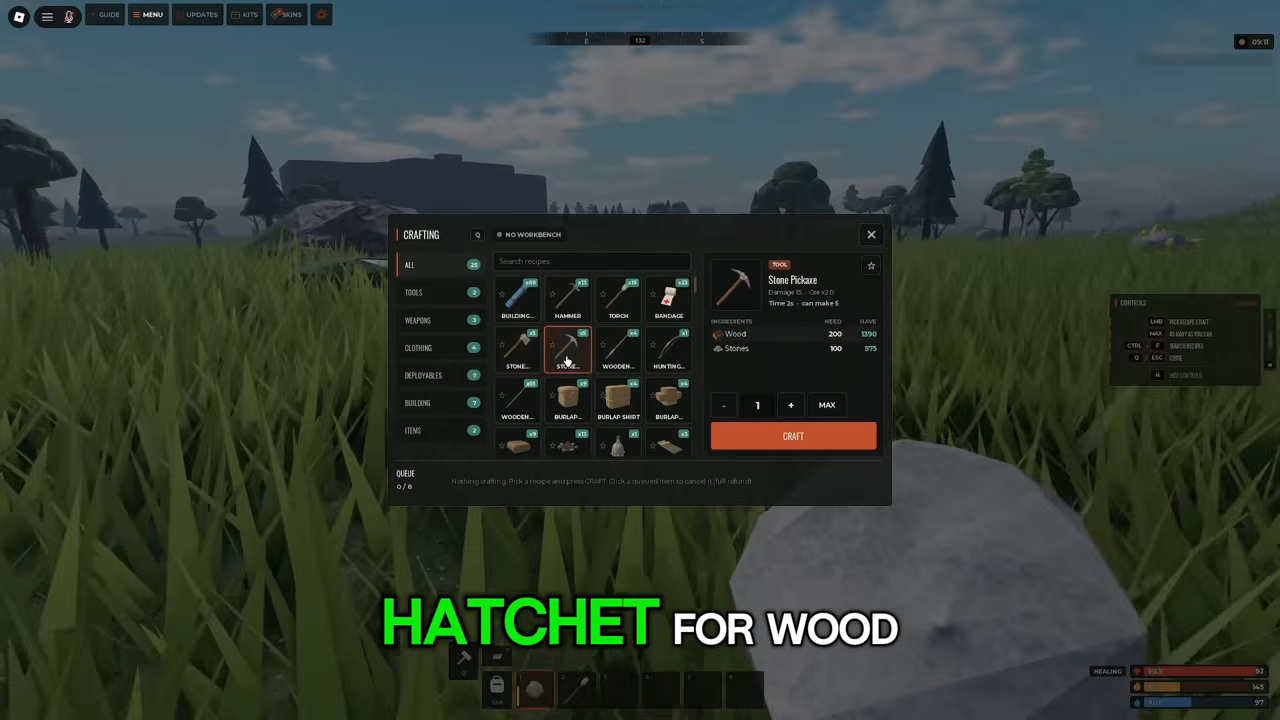
The Q CRAFTING menu is where Fust Survival's tools live. Press Q to open CRAFTING; it splits into ALL, TOOLS, WEAPONS, CLOTHING, DEPLOYABLES, BUILDING and ITEMS, and the CRAFTING menu holds those five craftable items.
Craftable tools and their verified jobs
Craftable tools and their verified jobs
- Tool
- Stone Pickaxe
- Verified use
- Mines sulphur ore and metal ore from ore nodes
- What you'll see
- The HUD names the ore you gained
- Tool
- Hammer
- Verified use
- Upgrades built twig structures to Wood
- What you'll see
- Log reads "Upgraded to Wood"
- Tool
- Building Plan
- Verified use
- Places foundations, walls and doorways; installs a Wooden Door
- What you'll see
- Semi-transparent foundation ghost before placement
- Tool
- Stone Hatchet
- Verified use
- Craftable in the CRAFTING menu; specific use not established
- What you'll see
- —
- Tool
- Wooden Spear
- Verified use
- Craftable in the CRAFTING menu; specific use not established
- What you'll see
- —
Stone Pickaxe: the ore tool
The Stone Pickaxe is the clearest pick in the list, because both its cost and its job are visible. Its recipe card lists Wood 200 + Stones 100, shows Damage 15 and a craft Time of 2s, and reads "can make 5". Used on ore nodes, it produces sulphur ore and metal ore, and the HUD confirms the gain by naming the ore you collected.
Trust the recipe first and treat harvest numbers as server-dependent. The ore amounts seen with this tool came from a server running a DOUBLE RATES event, so each gain is inflated for that session and does not establish what a standard server gives per node. The ingredient list is the safer part to plan around because it comes from the recipe card itself.
Pick the Stone Pickaxe when your next task involves breaking ore nodes. If the node locations are the missing piece, the ore locations page is the companion read.
Hammer: upgrading what is already built
The Hammer's confirmed job comes after a structure exists. Hold the Hammer at a built twig structure and the upgrade interaction appears; complete it and the HUD log reads "Upgraded to Wood". That log line is your recognition cue that the structure's material changed.
The same example showed a 25 Wood entry alongside the upgrade, but it was recorded on a modded server, so treat 25 as an illustration rather than a fixed price. What matters for planning is the role: the Hammer acts on a structure that is already standing, which makes it the follow-up tool rather than the one that first puts pieces down.
Building Plan: placing the pieces
The Building Plan is a craftable blueprint item, and its job is placement. Before a piece goes down, the plan shows a semi-transparent placement ghost of a foundation on the ground, so you can see where it will sit. It was used to build a Foundation, a Wall and a Doorway, and to install a Wooden Door.
That ghost is the state to look for when you are choosing this tool: the semi-transparent footprint appears before you confirm the placement. The full building sequence — piece by piece, and how walls and doors combine — is covered in the crafting guide, so this entry stays on the Building Plan's role: it places building pieces and installs a door.
Stone Hatchet and Wooden Spear: craftable, use unconfirmed
Both names appear among the tools crafted in the CRAFTING menu, so they exist and can be made. What each one is actually for is not established, and that matters when you are choosing by task: the name alone does not prove whether a tool is for gathering, fighting or building. Until a specific use is documented, treat them as options to examine in the menu rather than answers to a particular job.
What you can use before you craft
You don't start empty-handed. Players wash up on the beach with a rock and a torch, and hitting a tree with the starting tool produces Wood and Cloth, so the first materials can be collected without any crafted tool. The example amounts (+290 Wood, +25 Cloth) came from a DOUBLE RATES server; the resource types are the dependable detail, not the totals.
The same Q menu is where you check what is craftable before spending materials: open CRAFTING and inspect a recipe card such as the Stone Pickaxe's to see ingredients, Damage, Time and batch size. If you are still at the beach stage, the beginner guide covers the wider opening loop.
How the verified tools fit together
The three confirmed tools cover different stages rather than competing for one slot. The Stone Pickaxe belongs to gathering, since its output is ore from nodes. The Building Plan belongs to placement, since its output is placed building pieces and an installed door. The Hammer belongs to upgrading, since it acts on a built twig structure and changes it to Wood.
That makes the choice straightforward for the two most common jobs: ore on your list means the Stone Pickaxe, and a twig structure you want to improve means the Hammer. When you are laying out a base, the plan comes before the hammer — the plan puts the pieces down, and the hammer has something to upgrade only once a twig structure exists. The Stone Hatchet and Wooden Spear stay outside that chain until their uses are established.
Related Guides
Crafting Menu and First Tools
Open the CRAFTING menu with Q, read recipes and craft the Stone Pickaxe and your other first tools.
Gathering Wood, Stone and Ore
Learn how to collect wood, stone and ore with your first tools, plus what each material is used for.
Base Defense After a Raid
Harden an existing base with the Tool Cupboard, a locked airlock and Hammer upgrades, then rebuild after a raid.